Features reviewed on from AuthoredUp's own product pages.
Feature matrix
Each AuthoredUp entry links to the official page where we checked it. “Not found” means we couldn't find it on AuthoredUp's own pages, not that it definitely doesn't exist.
| Capability | Spark Linky | AuthoredUp |
|---|---|---|
| Publish to LinkedIn personal profiles | Yes | YesUses LinkedIn's native schedulingSource ↗ |
| Publish to LinkedIn company pages | Not yetPending LinkedIn's approval for page access | YesIncluded on every planSource ↗ |
| Publish to other social networks | LinkedIn onlyBuilt for one network on purpose | Not foundAppears to be LinkedIn only |
| AI writing help | Yes | PartlyAI co-author in beta, credit-limitedSource ↗ |
| Learns your writing style from your own posts | YesTrain Style built from example posts you choose | PartlyBeta: train on your own or saved postsSource ↗ |
| Turns links, videos, or documents into post drafts | YesURL, YouTube, PDF, audio, or pasted text | PartlyReuses your own past posts; no link or video input foundSource ↗ |
| Talk through an idea by voice to get a draft | YesBrainstorm asks follow-up questions, then drafts | Not found |
| LinkedIn carousels (document posts) | YesBuilt-in carousel studio; publishes as a PDF document post | PartlyPDF upload; no designer foundSource ↗ |
| LinkedIn post analytics | YesPost and account analytics plus a weekly report | YesSource ↗ |
| Team approval workflow | Yes | PartlyShared draft review on Business plan; no formal approval step foundSource ↗ |
| Engagement tools (comments, inbox) | PartlyFocus queue for commenting on others' posts; no comment inbox | Not foundEngagement reminders; no reply inbox foundSource ↗ |
| Free plan or free trial | Paid plansSee current plans on the pricing section | 14-day trial14-day free trial; no free planSource ↗ |
Products change often. Check each provider's site before you decide.
Which one fits you
Choose Spark Linky if…
- You need help finding the idea: a voice interview, or turning a link, video, PDF, or audio into angles.
- You want a built-in carousel designer rather than uploading a finished PDF.
- You need a formal approval step for a team.
Choose AuthoredUp if…
- You already know what you want to write and want a strong editor close to LinkedIn's own composer.
- You manage several company pages and want them included on every plan.
- You prefer scheduling through LinkedIn's own native scheduler.
Where AuthoredUp is strong
AuthoredUp emphasizes a LinkedIn writing editor, drafts, a content calendar, and analytics. Its scheduling workflow uses LinkedIn's native scheduling, with availability tied to LinkedIn's own support.
Where Spark Linky is focused
Spark Linky can help create the raw material before editing: a guided voice conversation, source-to-post ideas, style training, carousels, and mind maps. It also includes scheduling and performance review.
How to decide
Choose the editor experience you prefer. If you already know what to write and want tools close to the LinkedIn composer, inspect AuthoredUp. If you need help finding and developing the idea first, try Spark Linky.
What Spark Linky looks like
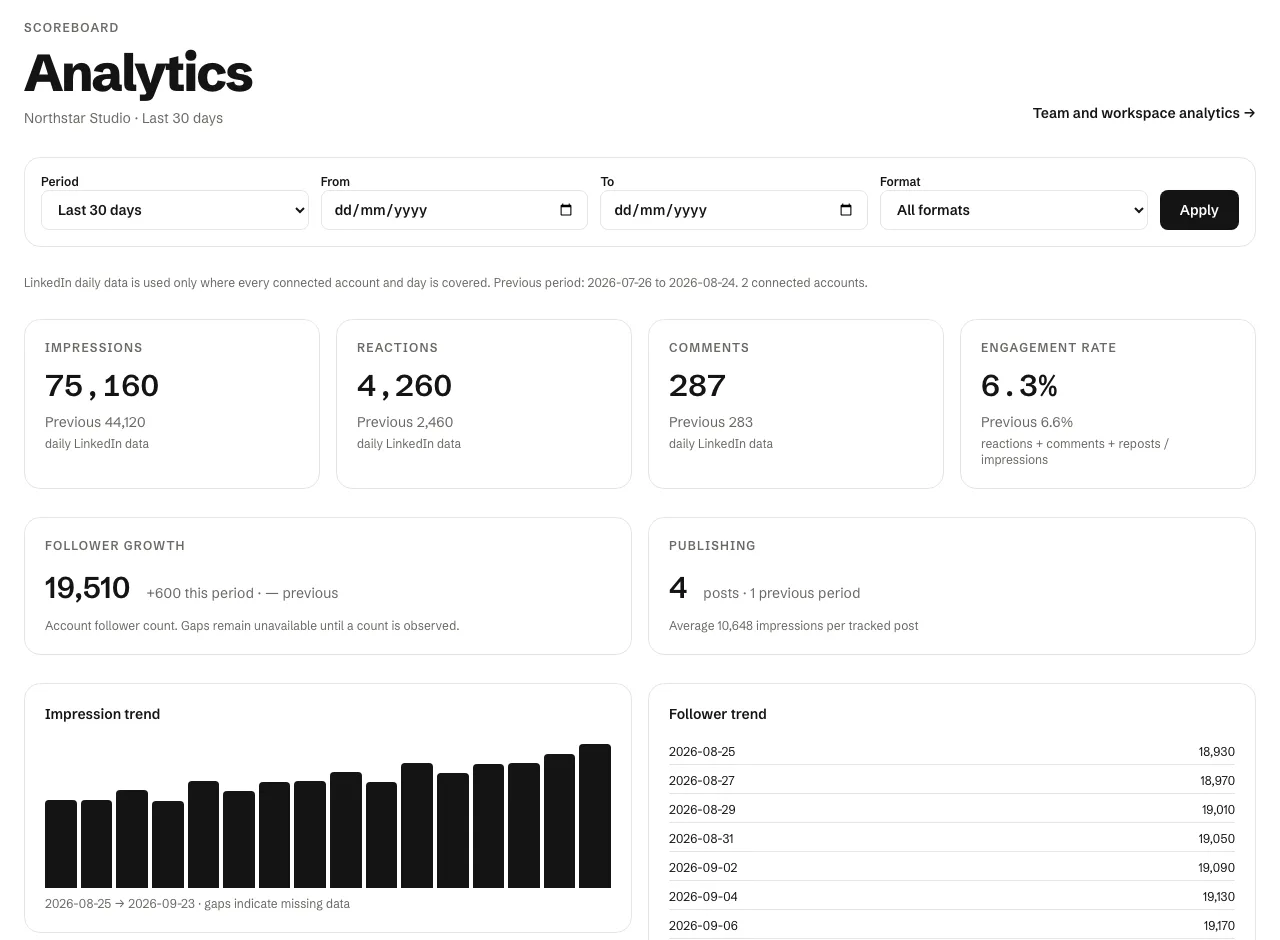
After a post goes live, Spark Linky's analytics compare it with your previous period and your own average, so you can see which ideas are worth following up.
Our review of AuthoredUp, September 29, 2026
AuthoredUp is a LinkedIn-only writing and analytics tool, available as a web app and a Chrome extension, with drafts, formatting, native LinkedIn scheduling, and a performance dashboard.
- AuthoredUp exposes LinkedIn's native scheduling in its editor rather than running its own scheduler.
- Its AI co-author, which learns your voice from your posts, was in beta when we checked.
- Carousels are published by uploading a PDF; we didn't find a slide designer.
Sources
Checked on September 29, 2026. Product features and plans can change; check each provider before deciding.