Features reviewed on from Buffer's own product pages.
Feature matrix
Each Buffer entry links to the official page where we checked it. “Not found” means we couldn't find it on Buffer's own pages, not that it definitely doesn't exist.
| Capability | Spark Linky | Buffer |
|---|---|---|
| Publish to LinkedIn personal profiles | Yes | YesSource ↗ |
| Publish to LinkedIn company pages | Not yetPending LinkedIn's approval for page access | YesSource ↗ |
| Publish to other social networks | LinkedIn onlyBuilt for one network on purpose | YesAbout a dozen networks, including Threads, X, and InstagramSource ↗ |
| AI writing help | Yes | YesIncluded on the free planSource ↗ |
| Learns your writing style from your own posts | YesTrain Style built from example posts you choose | Not foundTone controls onlySource ↗ |
| Turns links, videos, or documents into post drafts | YesURL, YouTube, PDF, audio, or pasted text | PartlyReformats existing posts or blog textSource ↗ |
| Talk through an idea by voice to get a draft | YesBrainstorm asks follow-up questions, then drafts | Not found |
| LinkedIn carousels (document posts) | YesBuilt-in carousel studio; publishes as a PDF document post | PartlySchedules uploaded PDFs; no built-in designer foundSource ↗ |
| LinkedIn post analytics | YesPost and account analytics plus a weekly report | YesFree plan limited to 30 days of historySource ↗ |
| Team approval workflow | Yes | YesTeam planSource ↗ |
| Engagement tools (comments, inbox) | PartlyFocus queue for commenting on others' posts; no comment inbox | YesReply to comments on posts and pagesSource ↗ |
| Free plan or free trial | Paid plansSee current plans on the pricing section | Free plan + trialFree plan (3 channels) and a 14-day trial of paid plansSource ↗ |
Products change often. Check each provider's site before you decide.
Which one fits you
Choose Spark Linky if…
- LinkedIn is your main channel and you want help developing the idea, not only scheduling it.
- You'd rather talk a story through or start from a webinar, PDF, or podcast than a blank box.
- You want to design carousels inside the same tool you write in.
Choose Buffer if…
- You publish to several networks and want one calendar for all of them.
- You need a free plan to get started.
- Replying to comments on your posts and pages from one inbox matters to you.
Where Buffer is strong
Buffer supports publishing across multiple social networks, including LinkedIn. Its LinkedIn workflow includes scheduling, analytics, and AI assistance. It is a sensible fit if your team wants one calendar for several channels.
Where Spark Linky is focused
Spark Linky is built around LinkedIn content creation: voice brainstorming, style training, source-to-post angles, carousels, mind maps, scheduling, and a weekly report. It suits a workflow that starts with an idea before it reaches a calendar.
How to decide
List the channels you publish to and the point where your team gets stuck. Choose Buffer if coordinating several networks is central. Try Spark Linky if developing a distinctive LinkedIn post is the harder part.
What Spark Linky looks like
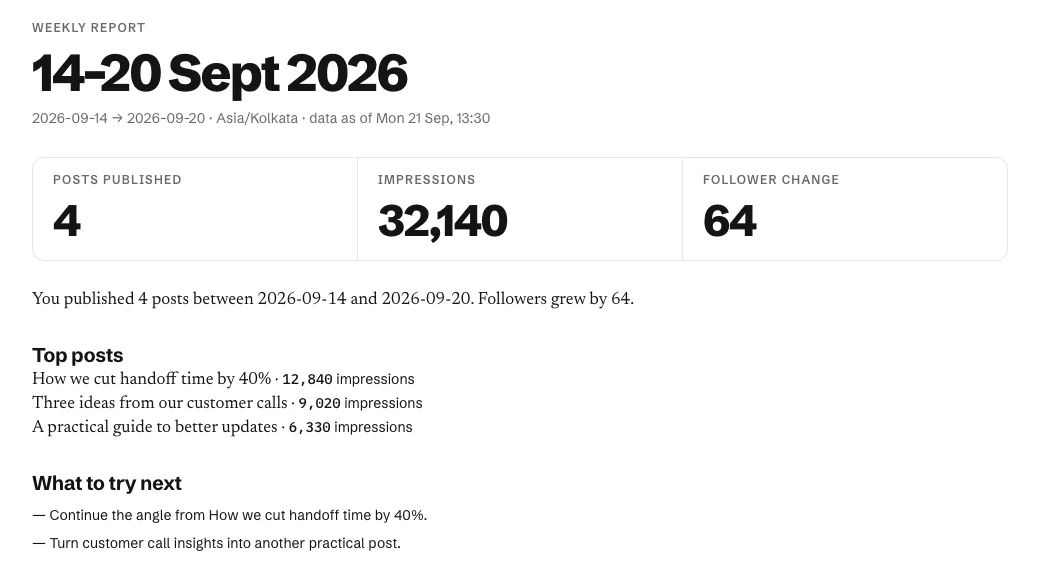
Each week, Spark Linky summarizes what you published, which posts did best, and which angles are worth continuing.
Our review of Buffer, September 29, 2026
Buffer is a multi-network planning and scheduling tool for creators and small businesses. LinkedIn is one of about a dozen channels it supports, alongside analytics, a comment inbox, and an AI assistant.
- Buffer schedules to both LinkedIn profiles and company pages, including PDF and carousel posts from uploads.
- Its AI assistant offers tone controls, but we didn't find a feature that learns from your own past posts.
- The free plan covers three channels; approvals are on the Team plan.
Sources
Checked on September 29, 2026. Product features and plans can change; check each provider before deciding.